
如何设定开机自定义脚本
脚本功能介绍
在使用自动重装系统完成后,系统将自动执行脚本命令。无需等待安装成功后手工执行,实现一键完成系统定制化操作。
使用开机自定义脚本
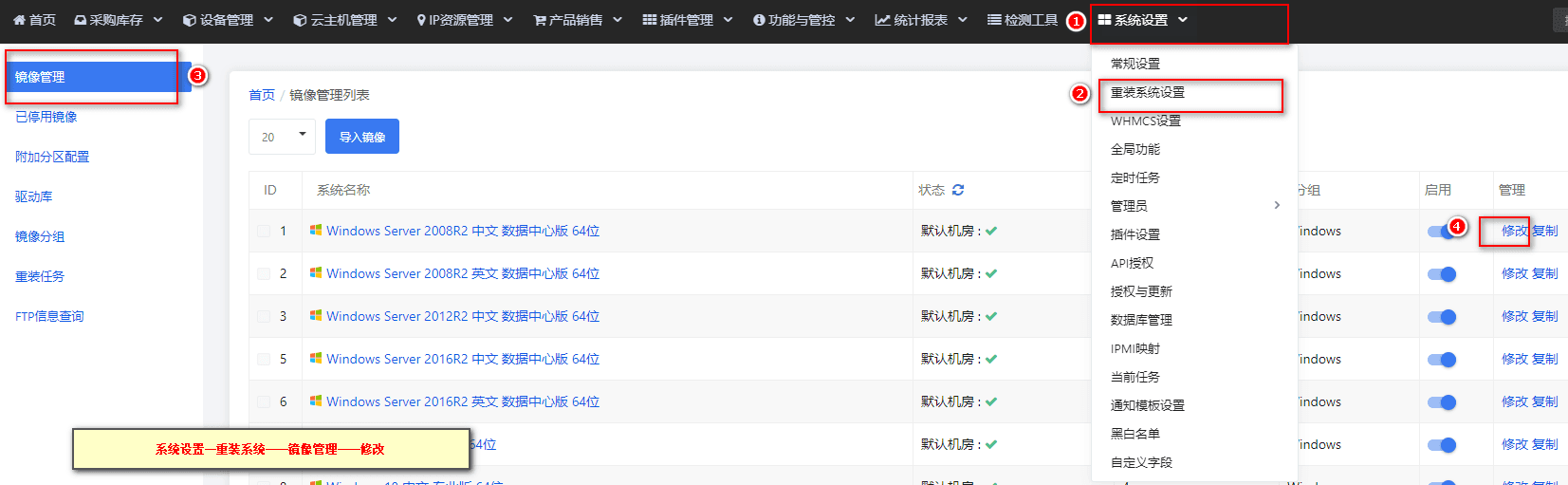
在【系统设置】-【重装系统设置】-【镜像管理列表】中,选定操作系统【点击修改】。
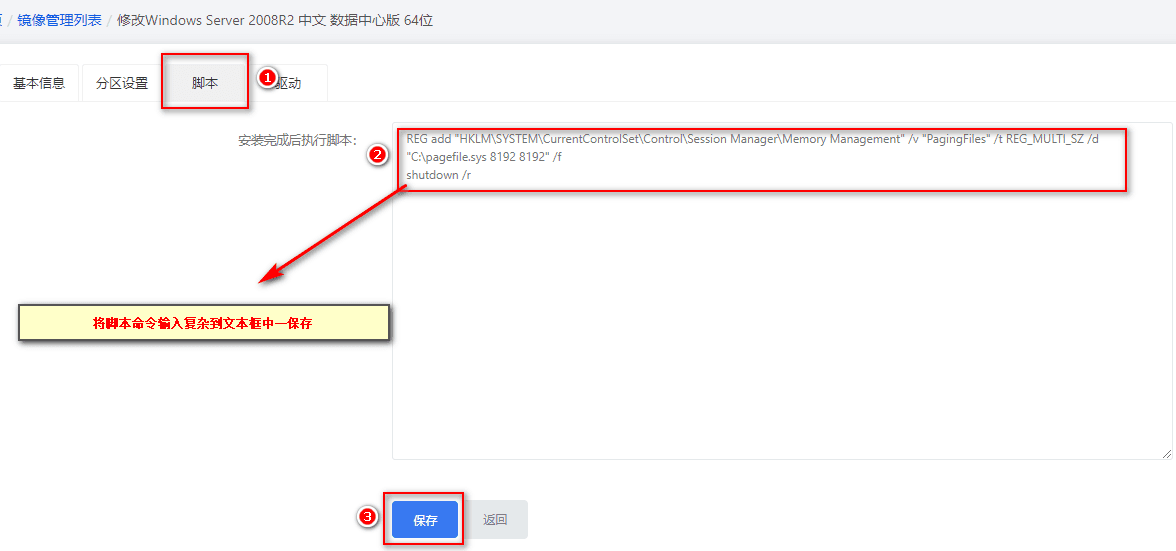
在脚本栏中输入复制开关机命令,则安装系统后将会自动执行。
注意:脚本根据镜像系统类型而论,各类系统不能混用,否则无效。如:Windows 与 Linux 的脚本不能混用,而 Windows server2003 与 Windows server2008 可用同一脚本。
Windows 常见脚本
放行单个或连续多个端口
netsh advfirewall firewall add rule name={项目名称} protocol=TCP localport={端口} dir=in action=allow关闭防火墙
netsh Advfirewall set allprofiles state off开启远程桌面连接
reg add "HKEY_LOCAL_MACHINE\SYSTEM\CurrentControlSet\Control\Terminal Server" /v fDenyTSConnections /t REG_DWORD /d 0 /f修改远程连接端口
reg add "HKEY_LOCAL_MACHINE\SYSTEM\CurrentControlSet\Control\Terminal Server\Wds\rdpwd\Tds\tcp" /v "PortNumber" /t REG_DWORD /d "{端口}" /f
reg add "HKEY_LOCAL_MACHINE\SYSTEM\CurrentControlSet\Control\Terminal Server\WinStations\RDP-Tcp" /v "PortNumber" /t REG_DWORD /d "{端口}" /f远程桌面安全验证
0 为允许任何链接 1 为仅允许安全的连接
reg add "HKEY_LOCAL_MACHINE\SYSTEM\CurrentControlSet\Control\Terminal Server\WinStations\RDP-Tcp" /v "UserAuthentication" /t REG_DWORD /d "0" /f允许 Ping
IPV4 脚本命令:
netsh advfirewall firewall add rule name=icmp4 protocol=icmpv4 dir=in action=allowIPv6 脚本命令:
netsh advfirewall firewall add rule name=icmp6 protocol=icmpv6 dir=in action=allow默认关闭防火墙
win10\16\19(两条需一起放入) :
netsh firewall set opmode mode=disable profile=ALL
netsh firewall set opmode mode=disablewin7\08\12 关闭防火墙:
netsh advfirewall set allprofiles state off开启防火墙:
netsh advfirewall set allprofiles state on